Optimal Trade Entry (OTE): ICT Fib Settings, TradingView Setup & Calculator
What OTE is in ICT/SMC trading, the exact 62%-79% Fibonacci settings, the 70.5% sweet spot, TradingView setup and how Gold (XAU/USD) traders combine OTE with Order Blocks and FVG.
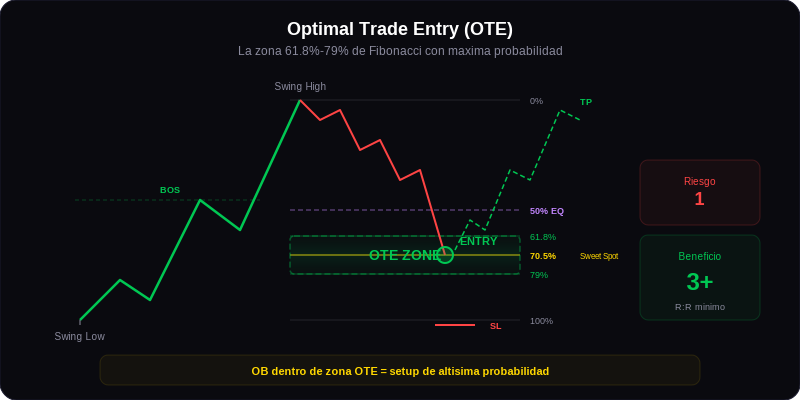
What Is the Optimal Trade Entry (OTE)?
The Optimal Trade Entry, usually called OTE, is an ICT concept introduced by Michael J. Huddleston (The Inner Circle Trader). It defines the price zone where institutional smart-money tends to fill orders during a pullback — specifically, the 61.8% to 79% Fibonacci retracement of the last impulsive leg. In that band the risk is small (you are close to the swing origin) and the reward is large (you can target the impulse high/low and beyond), which is why ICT calls it “optimal”.
OTE is part of the broader SMC (Smart Money Concepts) framework. Outside ICT circles, retail traders sometimes call it “the deep Fib pullback” — same idea, different vocabulary.
OTE Fibonacci Settings — the Official ICT Levels
These are the standard ICT OTE settings you should add to your Fibonacci tool on TradingView, MT4 or NinjaTrader:
| Level | Meaning |
|---|---|
| 0 | End of the impulse (target / 1:1) |
| 0.50 | Equilibrium (mid-range) |
| 0.618 | Start of the OTE zone |
| 0.705 | OTE sweet spot (70.5%, ICT exact) |
| 0.79 | End of the OTE zone |
| 1.0 | Start of the impulse (stop-loss anchor) |
Some ICT mentors also plot −0.27 and −0.62 as projection targets beyond the impulse high/low. Those are the “symmetrical” extensions used for partials.
Want the prices for your own chart? Use the ICT OTE calculator below: enter the swing high and low and it returns every level.
How to Set OTE on TradingView (Step-by-Step)
TradingView’s default Fibonacci ships with 0.236, 0.382, 0.5, 0.618 and 0.786. Close, but not ICT. Set it up once and save it as a template:
- Open the tool. Left toolbar → Trend Line Tools → Fib Retracement. Draw any retracement, then right-click it → Settings.
- Edit the levels. Uncheck 0.236, 0.382 and 0.786 (0.786 is not 0.79). Add 0.705 and 0.79. Keep 0, 0.5, 0.618 and 1.
- Add the targets. Add −0.27 and −0.62 as extensions for partial take-profits.
- Color it. 0.618 and 0.79 green (zone edges), 0.705 bold gold (sweet spot), 1.0 red (stop anchor), 0.0 blue (TP1).
- Save it. Template → Save As → “OTE — ICT”, or Save Defaults so every new Fib uses these levels.
- Anchor it correctly. Bullish OTE: swing low → swing high. Bearish OTE: swing high → swing low. Always from the origin of the impulse to the swing that confirmed the BOS.
Reference card (copy into the Levels tab):
 1.000  stop-loss anchor (impulse origin)
 0.790  OTE zone end
 0.705  OTE sweet spot (ICT)
 0.618  OTE zone start
 0.500  equilibrium (not OTE)
 0.000  TP1 (impulse extreme)
-0.270  TP2 (extension)
-0.620  TP3 (extension)
The same levels work in MT4/MT5 (Fibonacci → Properties → Fibo Levels) and NinjaTrader (Fibonacci Retracements → Price levels).
How to Identify a Valid OTE Setup
- Confirm an impulsive move that broke structure (BOS — Break of Structure) in the higher timeframe (HTF: H4, H1).
- Draw your Fibonacci from the origin of the impulse to its completion.
- Wait for price to retrace to the 0.618–0.79 zone. Anything shallower than 0.618 is NOT an OTE.
- Look for confluence inside that zone: an unmitigated Order Block, a Fair Value Gap (FVG) or an old support/resistance level.
- Drop to a lower timeframe (M15, M5) and wait for a bullish/bearish CHoCH (Change of Character) before entering.
Without HTF BOS + LTF CHoCH, an OTE alone is just a Fibonacci retracement.
OTE Entry Rules — Stop Loss, Take Profit and R:R
- Entry: 0.705 sweet spot if you want the best R:R, or the edge of the Order Block / FVG inside the zone if you prefer a tighter trigger.
- Stop loss: just below the 1.0 level (with a small buffer of 1×ATR for noise).
- Take profit 1: 0.0 — the impulse high/low, equal to 1:1 minimum.
- Take profit 2: −0.27 and −0.62 extensions, where the move usually finds the next liquidity pool.
- Risk per trade: 0.5%–1% of account. OTE trades are high-probability but not infallible.
Typical R:R on a clean OTE setup is 1:3 to 1:5, which is why ICT teaches it as the foundational entry pattern.
OTE on XAU/USD (Gold) — Why It Works So Well
XAU/USD has wide intraday ranges (often 80–120 pips) and strong reactions at Fibonacci retracements because institutional desks hedge Gold against the DXY. On Gold we use OTE in three main ways:
- Killzone OTE: wait for the London or New York open to create an impulse, then trade the OTE retracement back in the same session.
- Pre-session OTE: identify an HTF impulse on the daily/H4, then trade the OTE pullback during Pre-Asia or Pre-London (low-volume) when retracements complete.
- News-driven OTE: after high-impact data (NFP, CPI, FOMC) Gold often impulses then retraces 62–79% — a textbook OTE setup.
For a fully worked example, see our daily XAU/USD analysis — every report flags the OTE zone if one is in play.
Common OTE Mistakes
- Entering at the 0.5 level: that is the equilibrium, not the OTE. The whole point of OTE is the 62-79% deep pullback.
- Trading OTE without HTF context: an OTE inside a ranging market is noise.
- Ignoring the Order Block / FVG confluence: OTE alone has roughly 55–60% win rate; with OB/FVG confluence it climbs above 70%.
- Stop loss too tight: placing it inside the OTE zone almost guarantees a stop-out. The SL belongs below the 1.0 swing extreme.
OTE vs Premium / Discount
- In a bullish trend, the OTE pullback falls inside the Discount zone (below 0.5). You are buying low.
- In a bearish trend, the OTE pullback falls inside the Premium zone (above 0.5). You are selling high.
This is the same logic as buying support and selling resistance, but anchored to the most recent institutional impulse rather than arbitrary horizontal lines.
Quick FAQ
What is OTE in trading? A Fibonacci-based entry zone (62%–79% retracement) where smart-money traditionally accumulates positions before the trend continues.
What does OTE stand for? Optimal Trade Entry.
Is OTE the same as Fibonacci retracement? No — OTE uses a specific 62-79% sub-range of the Fibonacci tool, not the full 23-78% set retail traders typically watch.
Can OTE be used on any pair? Yes. It is timeframe- and instrument-agnostic. We focus on XAU/USD because Gold’s volatility makes the R:R particularly attractive.
What is the OTE sweet spot? The 0.705 level (70.5%), considered by ICT the exact midpoint of the OTE zone.
ICT OTE Calculator
Enter the swing high and swing low of the impulse. You get the exact OTE zone (61.8% – 79%), the 70.5% sweet spot, the stop anchor and the −0.27 / −0.62 targets.
| Level | Role | Price |
|---|
Fill both prices to calculate.